

Sensor-to-Reference analysis is based on comparing the sensor’s data to the GHI data measured by another sensor which you can trust. Typically it is a well maintained higher class sensor or a high class irradiance measurement system such as EKO STR system.
You can typically expect better agreement of the GHI or GTI measurements with a reliable GHI sensor on the same site than with a model irradiance data. It provides better accuracy and resolution to detect subtle issues in the measurement data.
For better results, always use both Single Sensor and Sensor-to-Reference analyses if available.
EKO Q Starter users can run the analysis but only have access to the Summary Analysis, which contains the first two pages of the full report.
You can also use Sensor-to-Reference with your own GHI correlative data. See Upload your own correlative data.
Prepare reference sensor
Configure the reference sensor that you trust as described in Configure reference GHI sensor in Setup correlative data section. This sensor must represent GHI measurements, and the quality of the data must be out of doubt. Consider running single-sensor analysis with this sensor and fix any issues reported.
Configure the analysis
Once the reference sensor is ready, follow the steps described in Configure Single Sensor Analysis with the following changes:
- Navigate to the sensor you wish to analyze.
- Visually control the data as described in Preview sensor data section.
- Proceed to Configure Analysis.
- Enable Site sensors data and select the reference sensor you prepared.

- Complete the configuration and save.
Run the analysis
Proceed to Analysis Output tab. Locate your analysis and click Run () button.
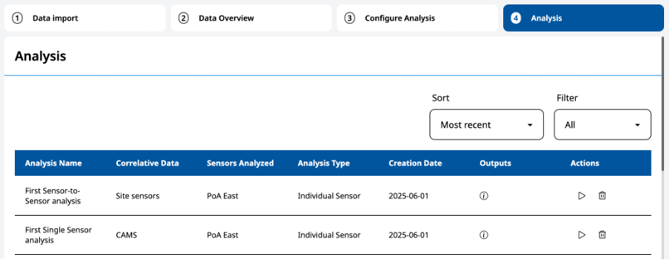
You can continue using EKO Q while the analysis runs.
Next article: Download and open an analysis report
Go back to: Setup correlative data