

The EKO Q uses alternative irradiance data and other meteorological data such as satellite, clear sky model, and weather information from external data services or provided by the user.
Configure access to external satellite data
You can use satellite-based irradiance data from external data services, configure access to them as described in Configure your account.
Configure reference GHI sensor
You can use a reliable sensor at the same site as reference sensor, similarly to how you use external correlative data.
Caution! Only use sensor data as correlative when you trust the sensor to produce reliable data. Among other factors, ensure that the sensor complies with the following:
- The sensor has been correctly installed in horizontal plane to measure GHI irradiance.
- The sensor has been cleaned regularly.
- The sensor data is imported with correct units of measure.
- The sensor data is imported with correct time zone.
- The sensor data passes the Single sensor analysis as GHI sensor, using LuciSun or CAMS correlative data and reports no major issues.
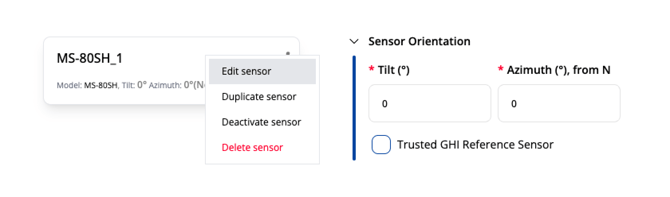
To enable using the sensor’s data as correlative, enable “Trusted GHI Reference Sensor ” button in the configuration panel of the sensor.
Upload your own correlative data
If you have reliable correlative data in a CSV (or similar) format, you can upload it as an additional sensor and follow the steps described in Configure reference GHI sensor above.
If you would like to integrate another source of reliable irradiance data, or if you encounter any issues accessing correlative data, please contact EKO-Q support.
Next article: Configure analysis
Go back to: Sensor data configuration check