

Accurate timestamps are critical for solar data analysis. They are used to calculate the sun position and to align irradiance data with other operational parameters, both from on-site monitoring systems and external data sources.
However, time shifts in timestamps are quite common in field data and can arise for several reasons. If left unnoticed, they can introduce significant bias and lead to incorrect analysis results.
The Time Shift test is designed to detect indications of a time shift in the data and support troubleshooting.
Note: Other issues may produce patterns similar to a time shift and influence the test results. A failed test should always be followed by further investigation.
Sources of Time Shift
Common causes of time shifts include:
- Clock synchronization issues
The data acquisition system may not be properly synchronized with coordinated time. This can include incorrect timezone settings, gradual clock drift, or irregular synchronization events. - Incorrect sampling conventions
For example, a 15-minute interval may be timestamped at the end of the interval, while the analysis assumes the timestamp refers to the start or midpoint. This can introduce apparent shifts of 7.5 or 15 minutes. - Errors during data processing
Data is often pre-processed to align with other datasets or analysis requirements. This includes resampling, interpolation, and merging. If sampling conventions, averaging methods, or measurement specifics are not handled correctly, the data can be distorted and appear time-shifted.
How to Read the Test Results
The Time Shift test offers multiple subtests. If all the subtests passed, your data looks good. If any of the tests fails, look closer at your data using other tests and seek help with EKO Support or other experts for troubleshooting.
Results are presented as:
- Tables, showing key numerical values and pass/fail decisions
- Plots, providing more detailed insights for deeper analysis
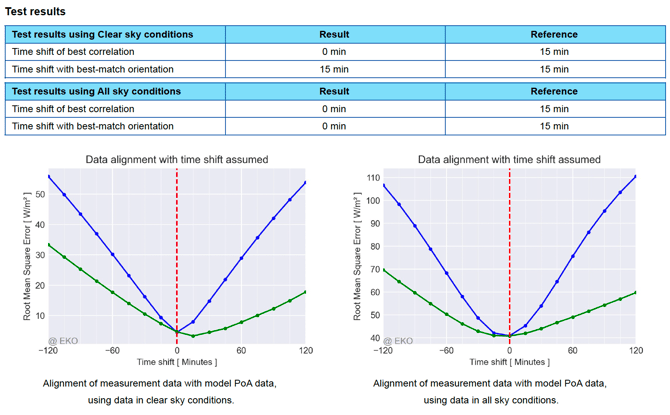
Subtests
The test evaluates how well the measured data aligns with the reference data when different time shifts are applied. The blue line represents the level of agreement between the measured and reference data for each assumed time shift, and the shift that provides the best agreement is reported in the results table.
An advanced option allows for joint Time Shift and Orientation optimization, where both the time shift and the sensor orientation are adjusted simultaneously to find the best possible match between the datasets.
Note: This feature is only available in the Advanced subscription plan.
The analysis is performed on data filtered for clear-sky conditions, shown in the left plots, as well as on all available data, shown in the right plots.
Problems That Can Look Like Time Shift
Several issues can mimic a time shift and affect the test results:
- Sensor misorientation
For example, a small azimuth error can increase morning values and decrease afternoon values, resembling a time shift.
EKO recommends always analysing time shifts along with the Orientation Analysis.
-
Incorrect or biased reference data
Using inaccurate reference datasets (e.g., models or external sources) can lead to misleading results.
Be extra careful when using your own measurement data as reference or using the data obtained from external resources and models.
-
Incorrect sensor location
Errors in location data affect expected solar patterns. Check the settings in Data Provided section. -
Shading or soiling
These can distort irradiance patterns in a way that resembles time shifts. Check Nearby Shading. -
Slow sensor response
Some pyranometers respond slowly to changes in irradiance, creating an apparent delay. Fast-response instruments like the EKO MS-80SH are not affected by this.
Common Patterns and How to Interpret Them
- Symmetric consistent time shift: All tests agree on the same value.
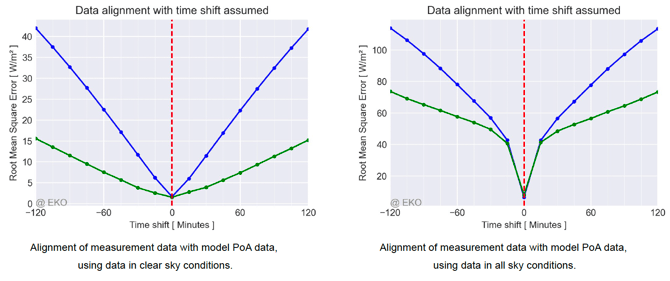
This pattern suggests the true time shift in the data. In the picture above, the shift is zero. If your data shows a non-zero shift, check your system for clock synchronisation, check sampling conventions, check the reference data for implicit time shifts. - Asymmetric patterns or disagreement between tests
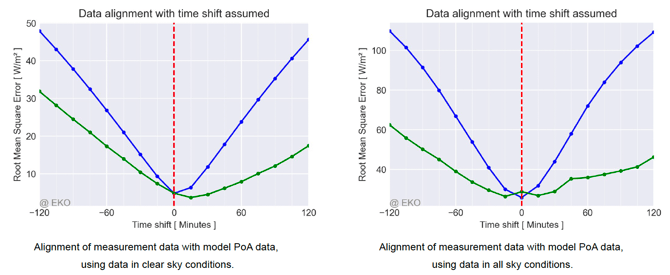
If the results differ between clear-sky and all-sky conditions, or if the joint optimization does not agree with the main result, this usually indicates issues other than a time shift. Common causes include shading, sensor misorientation, data gaps, or insufficient clear-sky data. - Clear result with Clear Sky and uncertain result with all sky conditions
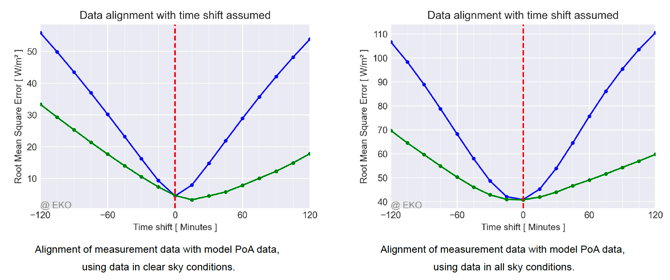 This pattern is common when using low-resolution reference data, such as reanalysis data or satellite data with significant interpolation and approximation. These sources often cannot capture rapid irradiance changes caused by clouds, which reduces agreement with measured data. This behavior is expected, and the results should be interpreted with slightly higher uncertainty.
 - Definite zero shift with all sky conditions with a less certain, non-zero shift using clear sky conditions only
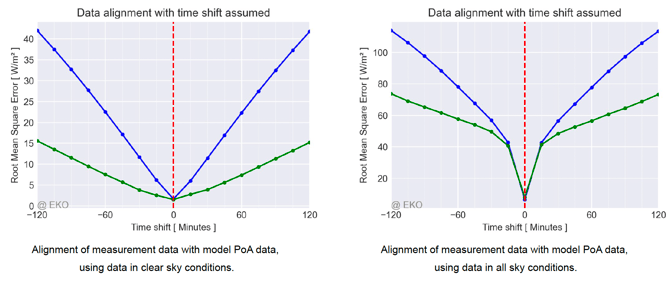
Such a pattern is typical when the measurement data of a co-installed reference sensor is used, often collected with the same data acquisitions system. The irradiance measurements of the two sensors are synchronously modulated by fast-changing clouds. A small assumed time shift leads to abrupt loss of the cross-correlation.
The minimum of the line on the all-conditions plot shows the true time shift between the two sensors’ data, with little to no effect from other possible issues including orientation.
The clear-sky-only version removes the fine structure due to clouds and compares the slower diurnal cycles with more coarse resolution. It may reveal effects of other issues such as sensor orientation, asymmetric shading or even a common time shift compared to absolute time that affects both sensors. Combine the analysis with the one using satellite model data for extra insights.
- Both clear sky and all conditions plots show uncertain time shifts, disagreeing on the best value
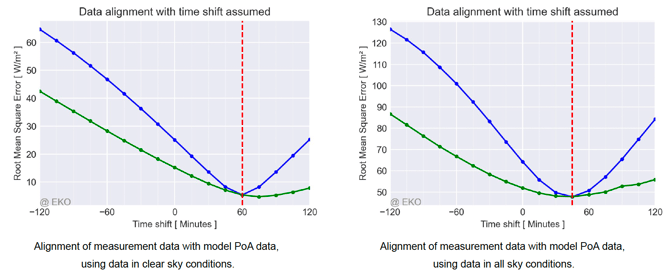
Such a pattern suggests that a time shift changes with time. Check the time zone settings and look for other inconsistencies in the site and data descriptions.
- Significant difference between simple agreement and joint time shift and orientation test (if available)
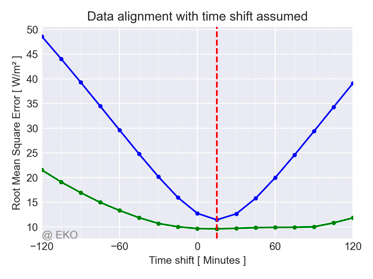 The green line, representing the joint time shift and orientation test, typically aligns with the blue line (time-shift-only) at the true time shift. For other assumed time shifts, it often shows lower RMSE values due to a partial compensation effect, where an adjusted sensor orientation reduces the mismatch caused by an incorrect time shift.
If the green line is consistently lower than the blue line, this indicates that a different sensor orientation provides a better match to the data than the one currently defined. In this case, it is recommended to check the sensor orientation, as well as possible shading or other systematic sources of error.
Final Note
The Time Shift test is a diagnostic tool, not a definitive answer.
It highlights patterns that may indicate timing issues, but results should always be interpreted together with other tests and site knowledge.