

Your EKO Q Data Quality Report is designed to help you understand whether your irradiance data can be trusted, what may need attention, and how confident you can be in different conclusions. It is not a simple “pass or fail” document. Instead, it provides evidence, highlights risks, and guides you step by step toward the most likely explanations.
This guide explains how the report is structured, how it should be read, and how to interpret the results in a practical way.
How the report is structured
The report is intentionally structured from general to detailed. The first pages are prepared for anyone, including users without deep technical background. As you move further down, the report becomes more detailed and assumes more experience with solar measurements and data analysis.
You do not need to understand every plot to benefit from the report. Many users will get what they need from the first one or two sections. The later sections are provided for users who want to understand why something looks the way it does.
Executive Summary: your starting point
The Executive Summary is the most important page of the report. It is designed to answer the main questions quickly, without requiring you to inspect plots or numbers in detail.
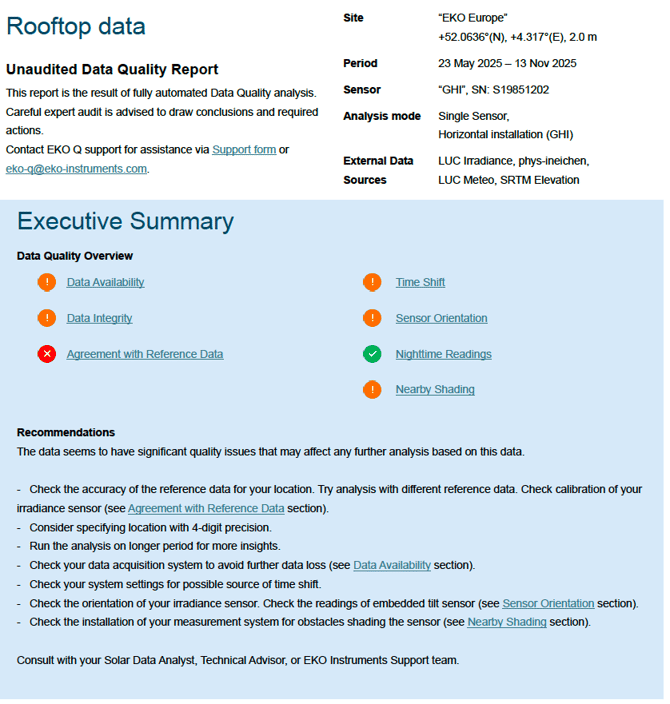
Here you will see which site and time period were analyzed, which sensor or sensors were included, and what type of analysis was performed. This could be a comparison against satellite or model data, against another sensor on site, or against a tracker-based reference system.
The summary then evaluates several key topics, such as data availability, data integrity, time alignment, sensor orientation, nighttime behavior, shading, and agreement with reference data. Each topic is marked with a colored status icon.
Green means that no unusual behavior was detected and no action is required. Orange means that something may need attention or that the result is uncertain, so it is worth reviewing. Red means that a clear issue was detected and should be investigated.
It is important to understand that orange does not mean your data is bad. It simply means the system cannot be fully confident and wants to draw your attention to that topic, for you to decide whether a problem is there
At the bottom of the Executive Summary you will also find recommendations. These are practical suggestions, such as checking sensor orientation, improving location precision, or verifying calibration or scaling. Each recommendation is linked to the section of the report where the supporting details can be found.
For many users, the Executive Summary alone is enough to decide what to do next or what kind of help is needed.
To better understand how input data is evaluated in the report summary, see Check Input Data in the Test Summary.
Tests Summary: a compact technical overview
The Tests Summary provides a condensed view of all the tests performed in the report. Each test is shown with its color-coded status, its numerical result, and the expected acceptable range.
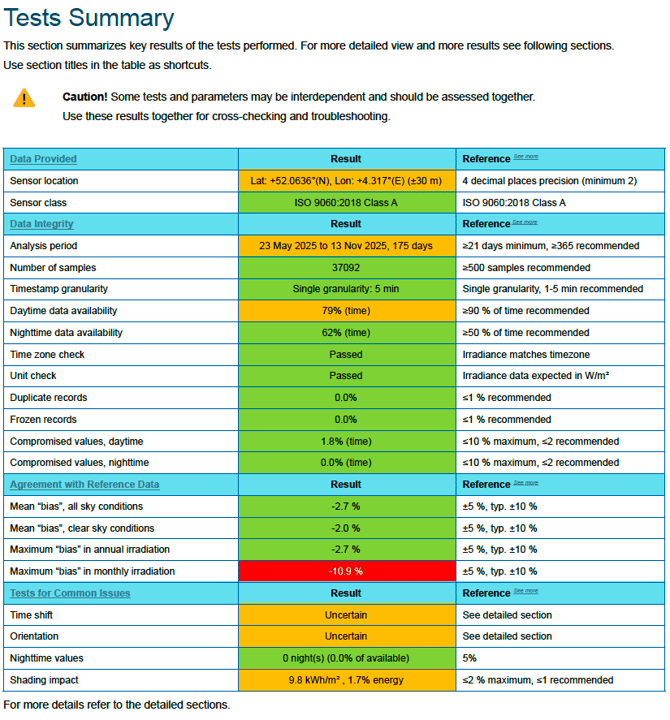
This section is especially useful if you want to share the report with a technical colleague or quickly identify which topics deserve closer inspection.
Orange results typically indicate that the value is close to the expected limit or that the uncertainty of the result is too large to draw a firm conclusion. Red results indicate that the value is clearly outside what would normally be expected.
This section helps you prioritize, but it is not meant to replace the detailed sections that follow.
Each section of the Tests Summary is explained in more detail in separate articles. You can learn more about the input data checks in Check Input Data in the Test Summary, the data integrity checks in Understand Data Integrity checks in the Test Summary, the reference comparison in Agreement with Reference Data in EKO Q - Test Summary, and the issue detection checks in Tests for Common Issues in Test Summary.
Data Provided: checking the assumptions
Before interpreting results, the report shows the information it used as input. This includes site location, altitude, time zone, sensor type and class, tilt and azimuth, and reference data sources.
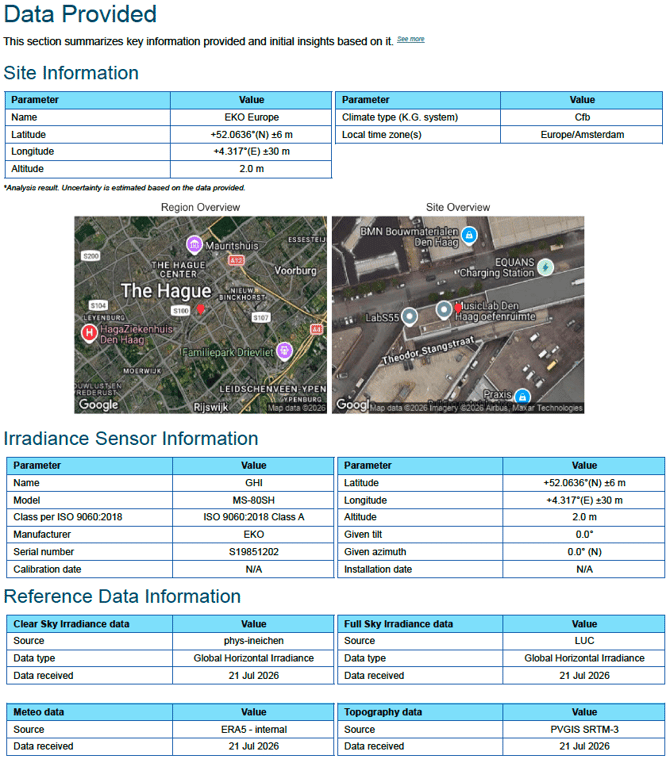
This section is critical because many apparent data problems are actually caused by incorrect or imprecise metadata and assumptions. For example, coordinates that are rounded too much can affect sun position calculations. An incorrect tilt or azimuth can create patterns that look like time shift or shading. Unrealistic expectations for a given sensor class can make normal behavior look problematic.
For a detailed explanation of the input data section in the Detailed Report, see Check Input Data.
Data Integrity: does the data look realistic?
The Data Integrity section answers a very basic but crucial question: does the data look like real solar irradiance data for this location and time of year?
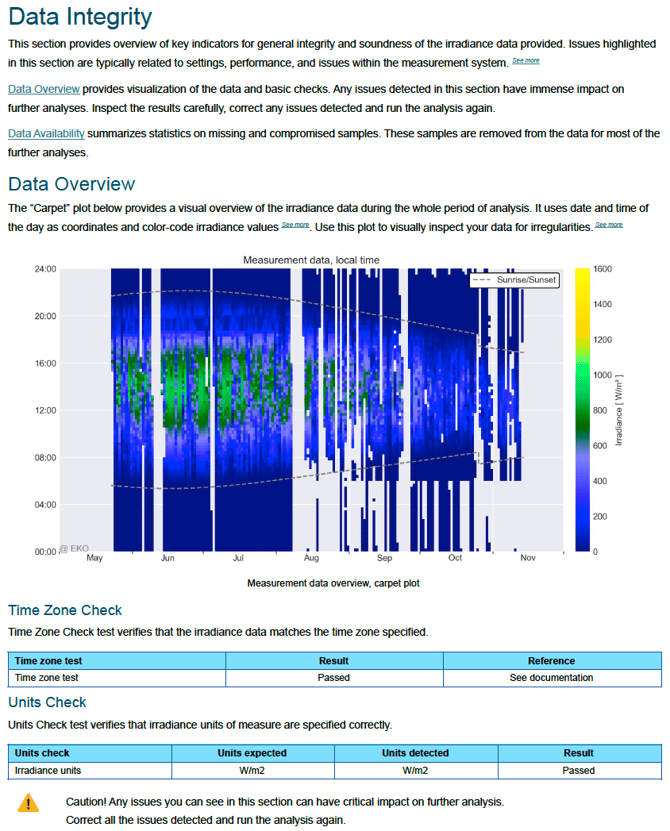
A key element here is the overview plot that shows irradiance over the entire analysis period. This plot allows you to quickly see whether the data follows expected daily and seasonal patterns, and whether it stays within sunrise and sunset boundaries. (Check our Carpet plot article to understand better)
This section also checks whether the time zone is handled correctly, including daylight saving time transitions. Time zone errors are very common and can silently affect almost every other test.
Finally, the report verifies that the measurement units are correct. Using incorrect units can lead to large, misleading biases.
These basic checks are critical for more advanced analyses. If issues are detected in this section, they should be corrected before drawing conclusions from later parts of the report.
To understand the detailed checks behind this section, see Understand Data Integrity checks in the Detailed Report.
To better understand the overview/carpet plot used to visualize data behavior over time, see Read and understand the carpet plot.
Data Availability: completeness and resolution
This section describes how complete your data is and how it is sampled over time. It shows how much data is missing, how large the gaps are, and how frequently measurements are recorded.
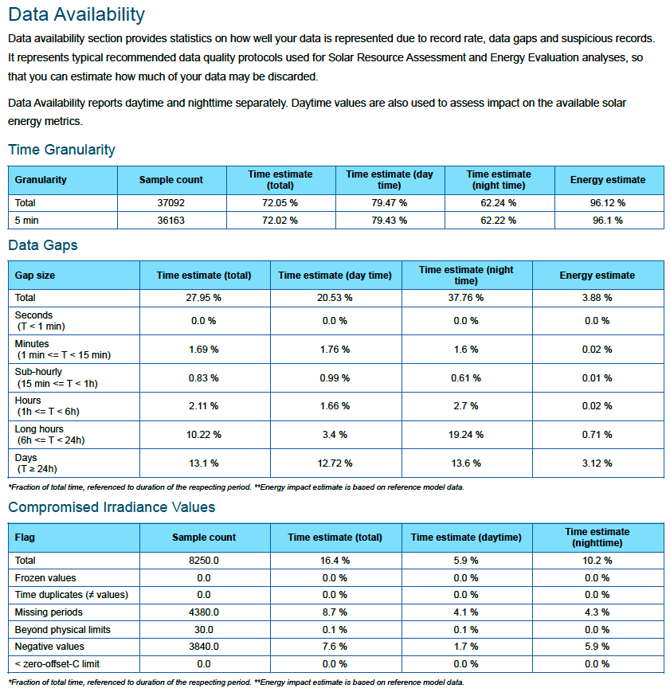
Not all data gaps have the same origin and the same impact. Large gaps lasting hours or days often indicate system downtime and may require model-based gap filling. Small gaps lasting seconds or minutes are usually logging or synchronization issues and often have little impact on most analyses.
The report also evaluates the time resolution of your data. Very coarse time resolution reduces the confidence of several tests, especially those related to timing and alignment.
Tests for common issues: understanding typical problems
This part of the report looks for patterns that are commonly associated with real-world measurement issues. Each test is designed to highlight a specific problem while assuming other parameters are correct. At the same time, some problems can make more than one test fail. It is therefore worth analysing the results of all the tests together.
Time shift
The time shift test checks whether timestamps may be offset. It compares your measurements to reference data under both clear-sky and all-sky conditions and looks for a time shift of the best alignment.
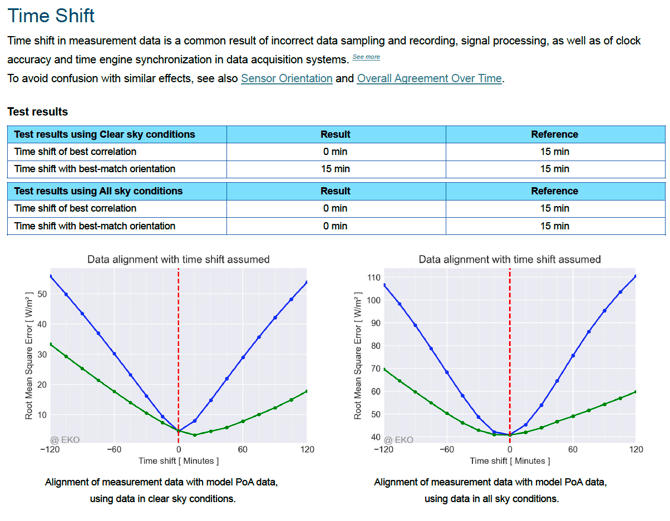
Clear-sky conditions often provide a cleaner signal, while all-sky conditions can sometimes be more informative when clouds dominate the dataset. The report shows both to help you understand the uncertainty.
It is important to interpret time shift together with sensor orientation. A sensor that is slightly misoriented can produce patterns that look very similar to a time shift even if no real shift in time is present.
For a deeper explanation of how the time shift test works and how to interpret its results, see Time Shift Test.
Sensor orientation
This test evaluates whether the data fits best with the provided tilt and azimuth or with a slightly different orientation. Small deviations of one or two degrees may be result of test uncertainty and not necessarily a sign of a problem.
Larger deviations may indicate a mounting issue or incorrect metadata. In such a case, time shift and other analyses often report a problem, too. A strong sign of an orientation issue is when correcting the tilt or azimuth and rerunning the analysis improves several results at once.
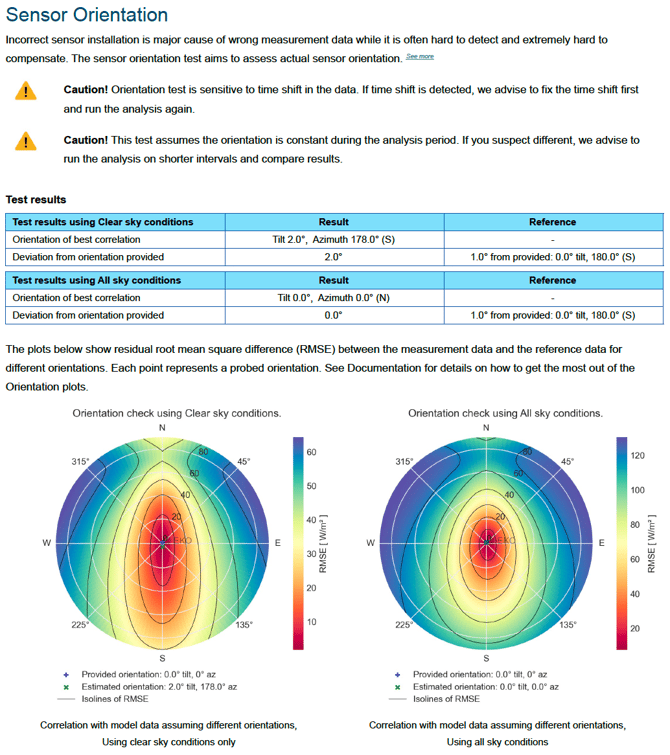
For more details on tilt, azimuth, and orientation-related patterns, see Sensor Orientation Test.
Nighttime readings
Many users expect nighttime irradiance to be exactly zero. In reality, thermopile pyranometers measure an energy balance and often show small values at night, with negative values prevailing. This behavior is normal, depends on weather and cloud conditions during the night and is subject to Thermal Offset specifications of the pyranometer. It does not indicate a faulty sensor.
What matters is whether nighttime values are consistent and free of extreme outliers. Sudden spikes or unusual patterns at night often point to issues such as moisture in connectors, grounding problems, or electrical interference rather than sensor failure.
This part of the report is particularly useful for diagnosing measurement system issues even when daytime measurements look fine.
EKO recommends to always log night time data and avoid manipulations including clipping, removing or repairing any nighttime data.
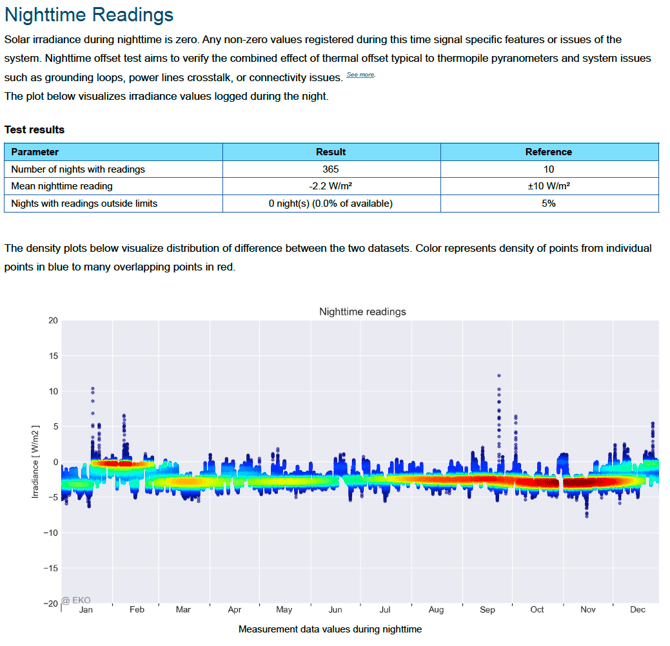
To better understand normal and abnormal nighttime irradiance behavior, se Nighttime Readings.
Shading
The shading analysis looks for sun angles where irradiance is consistently lower than expected, which may indicate obstruction by nearby objects.
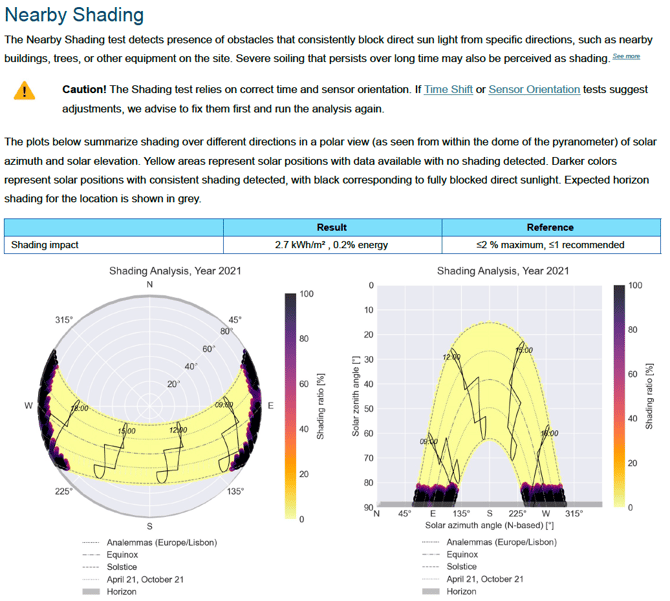
Small shading losses are often negligible, especially if they represent less than a few percent of total energy. Larger losses may justify a site inspection.
For more information on how EKO Q detects possible shading patterns, see Nearby Shading.
Agreement with reference data
In this section, your data is compared to the chosen reference using multiple metrics, such as average bias, monthly and annual deviations, scaling factor of a linear fit, and long-term trends.
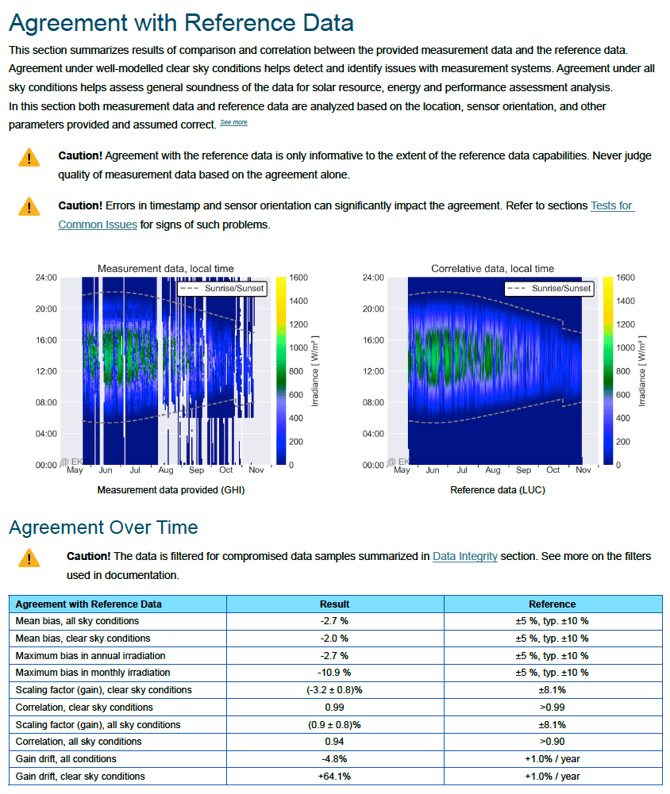 It is essential to understand that disagreement with a reference does not automatically mean your sensor is wrong. The reference itself may have limitations, may be affected by clouds, or may suffer from soiling or shading.
The report therefore emphasizes patterns across multiple plots rather than any single number. Consistent behavior across different views provides stronger evidence than isolated deviations.
For a detailed explanation of the comparison metrics and plots, see Agreement with Reference Data Detailed Report.
To understand how agreement changes across months or years, see Agreement over Time.
For help interpreting the irradiance difference plot, see Understand the Absolute Irradiance Difference plot.
To understand how linearity is evaluated between your data and the reference, see General Linearity.
For more information about angle-dependent differences, see Correlation with Solar Zenith Angle.
Why different reports can look very different
The same sensor can produce very different-looking reports depending on whether it is compared to model data, another sensor, or a tracker system. Each reference helps answering different questions and has different limitations.
For this reason, there is no single plot or test that explains everything. The report is designed to combine multiple insights and guide you toward the most plausible explanation.
How to use the report effectively
A practical way to use the report is to start with the Executive Summary, note any orange or red topics, review the related sections, verify your setup information, and rerun the analysis if corrections are made.
The report is a decision-support tool. It helps you understand risk, uncertainty, and likely causes, but it does not replace expert judgment. When results remain unclear or conflicting, seeking expert support is highly recommended.
If you want to better understand the test summary, you can start with the article: Check input data in the Test Summary
If you want to move on to the detailed report and plots, you can start by : Check input data in the Detailed Report