

What is this about?
Data Integrity Checks in EKO Q help you understand whether your dataset is complete, consistent, and physically sound to set a solid base for your analyses. The checks inspect general data structure, look for irregularities on a large scale, and summarise key informative metrics.
The checks follow the requirements of industry standards such as IEC 61724-1 and ISO/TR 9901, solar industry best practices and recommendations of EKO Instruments.
Why this matters
Solar Irradiance data analysis relies on measurement data being collected correctly. Yet measurement data depends on the data acquisition system it comes from. Undetected systematic problems in data structure bias and corrupt all the analyses and lead to wrong conclusions. For example:
- Missing data during peak sun hours can underestimate performance
- Incorrect timezone can shift the entire solar profile
- Wrong units of measure require conversion before the data can be used
Industry standards like IEC 61724-1 recommend carefully selected settings and data verification before any further analysis. Data Integrity Checks look for patterns that often suggest critical issues with your data acquisition system or irradiance sensor, which in turn can compromise all the analyses that follow.
Note: Whether your data is still good for your needs depends on your application. Some checks may be relevant or not in your case. Data Integrity Checks help raise general flags to let you see your data better and decide.
How to read the results
Think of data integrity as a simple question:
“Does this data look trustworthy?"
- If most checks look good → your data is reliable
- If some checks fail → results should be interpreted with caution
- If many checks fail → it’s worth investigating before using the data
See also the detailed section (available in Full report) for more insights.
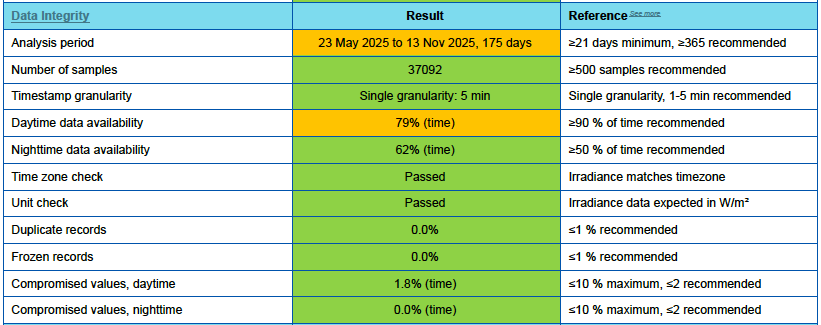
1) Analysis period
The selected time range may have a big impact on the results of your analysis, depending on your application. Some require multiple years of observation, while a few weeks is fine for others. A full year is a universal recommendation, because it includes seasonal changes and different sun angles for most deep analyses to work well.
2) Number of samples
The more data you have, the more reliable your analysis will be. How many samples is enough depends on your application, sample rate and other factors.
EKO-Q uses a simple minimum threshold, but leaves it to you. Check the number and decide if it matches your expectations from your data and the data files you use.
3) Timestamp granularity
This check refers to how often your data is recorded, the rate of “records” in terms of IEC 61724-1. While individual measurements often happen at a higher sample rate, only aggregated values of all the samples during the record interval must be recorded for analysis.
Record rate should be fast enough to detect all the fast changes your application requires. The faster the better but too fast records lead to large datasets, and it can become a burden. 1 minute is a universally agreed frequency for solar irradiance data in most PV applications. A 5-minute step is often still reasonable, but a slower rate may hide problems and significantly affect the quality of further analyses.
Changes in record rate during data acquisition is considered a poor practice and complicates further analysis.
Higher resolution up to 1-second provides better insights into system behavior, especially during rapidly changing conditions like passing clouds.
Lower resolution down to 1-hour may be preferred for long-term analyses. In this case, the lower resolution data for analysis should always be obtained from higher resolution measurement data.
Note: In Starter and Standard subscription plans, EKO Q may force resampling of your data to a practical rate of 1 to 5 minutes during data onboarding. Contact EKO sales team for analysis at full rate.
Note: Timestamp granularity check in EKO Q does not reveal details of how the records are obtained, such as measurement (sample) rate, sample averaging, timestamping convention, or post-processing of the measurement data.
4) Daytime data availability
This checks how much data is recorded during daylight hours, when solar energy is actually being produced.
Ideally, the dataset should be almost complete during the day, especially around midday when irradiance is highest. Missing data here has a strong impact on performance results. Data availability is reported in percentage of daylight time covered by the data, and in percentage of estimated energy.
If this check fails, it typically points to issues like communication problems, logger downtime, or sensor outages.
5) Nighttime data availability
At night, irradiance should be close to zero and the data is ignored in performance assessment. At the same time, nighttime data carries important diagnostic information. Checking nighttime data helps reveal issues with measurement setup which are not seen under bright sun.
Thermopyle pyranometers should measure small non-zero values at night, but consistent or significantly non-zero values typically indicate cabling issues, hardware problems with the sensor, or other problems with your data acquisition system. See the Nighttime Readings section for more details.
Enough nighttime data collected helps enable these analyses.
6) Timezone check
Accurate time is critical for analyses in Solar. Even a small mismatch of a few minutes can cause noticeable discrepancies with other data and lead to large errors. Time zone is basic to the time accuracy but it is often incorrectly set in filed data and leads to hours of time error. This check verifies that timestamps look aligned with the expected timezone.
Check and correct the timezone of your data if necessary before further analyses.
7) Unit check
This ensures the data is in the correct units of measure.
For example, irradiance is expected in W/m², not energy units like Wh/m². Mixing these can lead to incorrect analysis and misleading results while not necessarily obvious. The check verifies that the numerical values match the expectations and can be trusted.
8) Duplicate samples
This looks for repeated data points with the same timestamp and value.
Duplicates in data highlight special events in your datalogger such reboots or an unexpected behavior, with the data collection software, or with data post-processing and file operations. Frequent duplicates may indicate growing issues with data logging or data merging. While often easy to correct, they can affect data quality and analysis accuracy and should be carefully monitored.
9) Duplicate timestamps
Records with the same timestamp but different values form a special case. Typical causes include clock synchronization, daylight saving adjustments, and mistakes in data processing.
Such duplicates can be both a heath-check for automated clock adjustment and symptoms of deep problems.
10) Frozen samples
This identifies periods where the value does not change over time.
In practice, measurements like irradiance should always show small variations. If values remain constant for too long, it usually indicates an issue with the measurements or with system setup.
Such frozen values can be caused by communication problems, sensor failure, or simply too low vertical resolution of the datalogger. It may also happen due to mistakes in post-measurements data processing such as resampling, merging and rounding.
When many frozen samples are detected, it means the system may no longer be capturing real changes, and the data should be reviewed.
11) Compromised samples
This highlights values that don’t make physical sense from the first glance.
Examples include negative irradiance during the daytime, unusually high values, or sudden spikes. Such values are often caused by sensor errors, wiring issues, or external interference. Since exact causes cannot be reliably assigned without detailed inspection, these values are typically excluded from further analyses.
Note: This check assumes correct timestamps, sensor orientation and other factors that may be wrong in many cases of field PV data. Consider this check preliminary if further analyses reveal issues or you have other doubts.
In short
Data integrity checks help you make sure your irradiance data looks usable before you analyze it further.
They give you visibility into:
- Missing or incomplete data
- Sensor and data acquisition system behavior
- Timing and configuration issues
- Physically unrealistic values
If the data looks good, you can move forward with confidence.
If not, the checks help you understand where to look next.
For more details, see Detailed version.
Next, continue exploring the test summary in: Agreement with Reference Data in EKO Q - Test Summary
If you would like to review the overall report structure again, see: Read and Understand Your EKO Q Data Quality Report.