

What is this about?
Data Integrity Checks in EKO Q help you understand whether your dataset is complete, consistent, and physically sound to set a solid base for your analyses.
These checks inspect general data structure, look for irregularities on a large scale, and summarize key informative metrics. They are based on industry standards such as IEC 61724-1 and ISO/TR 9901, as well as solar industry best practices and recommendations from EKO Instruments.
Why this matters
Solar Irradiance data analysis relies on on accurate and properly collected measurement data. Yet measurement data depends on the data acquisition system it comes from. Undetected systematic problems in data structure bias and corrupt all the analyses and lead to wrong conclusions. For example:
- Missing data during peak sun hours can underestimate performance
- Incorrect timezone can shift the entire solar profile
- Wrong units of measure require conversion before the data can be used
Industry standards such as IEC 61724-1 recommend verifying data quality before performing any analysis. Data Integrity Checks help identify patterns that may indicate critical issues in your data acquisition system or sensor setup, ensuring more reliable results.
Note: Whether your data is still good for your needs depends on your application. Some checks may be relevant or not in your case. Data Integrity Checks help raise general flags to let you see your data better and decide.
How to read the results
Each check evaluates a specific aspect of your dataset independently.
- High-quality data will pass all checks
- Data issues may cause one or more checks to fail
If a check fails, review your data and correct any issues before proceeding with analysis. Keep in mind that a single problem may affect multiple checks. Refer to other sections of the report for additional context.
Data Overview
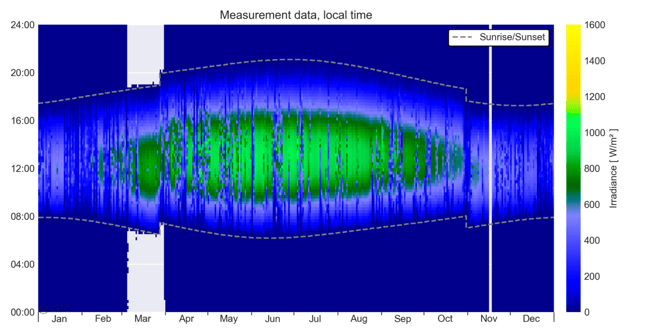
The “Carpet” plot provides a visual overview of the irradiance data during the whole period of analysis. It uses date and time of the day as coordinates and color-code irradiance values. See more in What is carpet plot.
Use this plot to quickly identify irregular patterns, such as gaps, shifts, or anomalies in the data. See more in How to read and understand Carper plot.
Time Zone Check
Accurate time is critical for analyses in Solar. Even a small mismatch of a few minutes can cause noticeable discrepancies and lead to large errors. Time zone is basic to the time accuracy but it is often incorrectly set in filed data and leads to hours of time error. The check verifies that timestamps look aligned with the expected timezone.
Multiple validation methods are used to detect inconsistencies and suggest corrections if needed.

If the test fails, check your data and provide the correct time zone before further analyses.
Sometimes the accuracy of the test is not enough to reliably detect the time zone, and an “Uncertain” result is reported. Check your data visually, using Carpet plot and other methods.
Note: Other issues, such as sensor misalignment or shading, may affect this check.
Units Check
Irradiance data is expected in W/m², but it may sometimes be recorded in other units (e.g. kW/m², Wh/m², J/m², W/ft²).
Mixing these can lead to incorrect analysis and misleading results while not necessarily obvious. The check verifies that the numerical values match the expected units of measure and can be trusted.

Data Availability
Data availability tests provide statistics on how well represented your data is due to record rate, data gaps and suspicious records. It represents typical recommended data quality protocols used for Solar Resource Assessment and Energy Evaluation analyses, so that you can estimate how much of your data may be discarded.
Note: Your analysis may use slightly different versions of these tests, and exact numbers may vary.
Data Availability tests report daytime and nighttime separately. Daytime values are also used to assess impact on the available solar energy metrics.
Time Granularity
Time granularity refers to how frequently data is recorded (also known as the record interval).
- A 1-minute interval is recommended for most solar applications
- A 5-minute interval is often acceptable
- Slower intervals may reduce data quality and hide important variations

Higher-resolution data (e.g. 1-second) provides more detailed insights, especially under rapidly changing conditions such as passing clouds.
Lower-resolution data (e.g. hourly) may be suitable for long-term analysis but should ideally be derived from higher-resolution measurements.
The dataset should use a consistent time interval. Changes in recording frequency complicate analysis and are considered poor practice.
Note: In Starter and Standard subscription plans, EKO Q may force resampling of your data to a practical rate of 1 to 5 minutes during data onboarding. Contact EKO sales team for analysis at full rate.
Note: Timestamp granularity check in EKO Q does not reveal details of how the records are obtained, such as measurement (sample) rate, sample averaging, time-stamping convention, or post-processing of the measurement data.
Data Gaps
Gaps mean periods of time without data.
Different gaps have different impact on your data, it depends on your application. Gaps in the middle of the day typically mean more than in the middle of the night. Short gaps are often easy to fill while filing large gaps may introduce significant bias or increase analysis uncertainty.
The data gaps are reported separately for daytime and nighttime, and grouped by gap length.
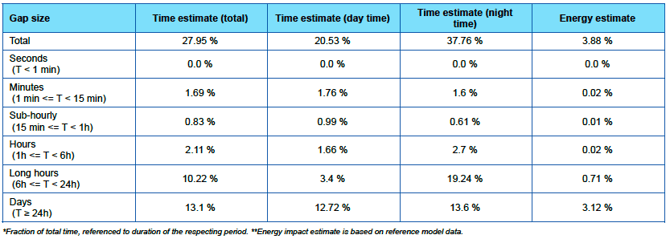
Note: Suspicious or invalid records may still count as data points but can be treated as gaps during analysis.
Compromised Irradiance Values
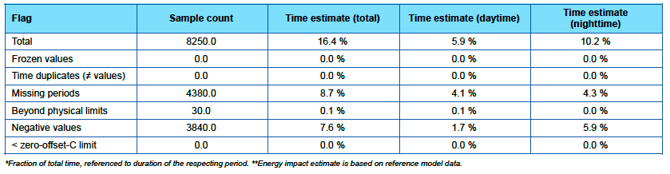
These checks identify data points that are physically unrealistic or suspicious, such as:
- Values outside expected physical limits
- Sudden spikes or drops
- Duplicate records
Such values often indicate sensor issues or data acquisition problems and are typically removed before analysis.
This section provides an estimate on how much data may be flagged erroneous. Make sure your data only has a small amount of them.
Note: Your analysis may use slightly different versions of these tests, and exact numbers may vary.
Note: EKO Q does not offer automated data correction. Suspicious records must be carefully examined separately.
Key takeaway
Data Integrity Checks help you identify potential issues in your dataset before they impact your analysis, allowing you to improve data quality and ensure more reliable results.